 RoutineSmith
Give every invoice exception one owner and one next action.
Track the reason, evidence, due date, revalidation and human decision in one visible queue. Six fictional cases show how the workflow works before you enter your own approved data.
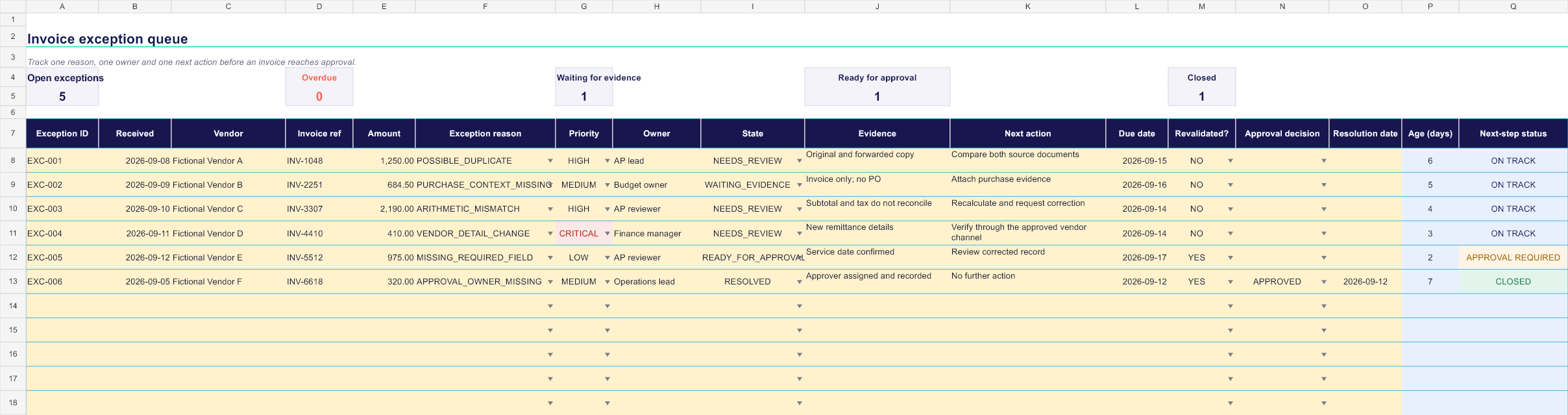
One editable worksheet with 100 queue rows, dropdown lists, formula-driven aging and status indicators, five operational summaries and six fictional examples. Yellow cells are for human input; calculated columns keep overdue work and approval prerequisites visible.
Inspect the queue before downloading it.
The preview shows the real workbook structure: reason codes, owners, states, evidence, due dates, revalidation, approval decisions and next-step status.
Keep the workbook and review checklist together.
The download stays free without registration. Request one email with the workbook link and the five checks to run before an invoice returns to approval.
Keep the next decision visible from intake to approval.
Closed reason codes
Classify missing fields, arithmetic mismatches, possible duplicates, missing purchase context, vendor-detail changes and absent approvers.
Visible ownership
Assign one owner and record one next action instead of leaving the invoice in an ambiguous shared queue.
Evidence and revalidation
Keep the evidence needed to close the exception and record whether the invoice was checked again after correction.
Due dates and aging
See overdue work, waiting evidence and the age of each record without hiding unresolved cases inside email threads.
Separate approval
Record the human approval decision only after the exception is resolved and the required validation is complete.
Start with the examples, then adapt the queue to your policy.
Keep a closed set of repeated exception reasons and map each one to an owner, backup and required evidence.
Enter one actionable step and a due date. Do not mark a case resolved because a request was merely sent.
Run the checks again after correction. Keep approval and payment release outside the exception queue.
The template organizes work. It grants no financial authority.
- It does not upload or process invoice documents.
- It does not verify supplier identity or bank details.
- It does not approve expenses or release payments.
- It does not replace your accounting, privacy or retention policy.
Questions about the invoice exception queue.
Is the invoice exception template free?
Yes. The Excel workbook downloads immediately without an account, payment or email address.
Does RoutineSmith receive the invoice data I enter?
No. The workbook is a local file. RoutineSmith does not receive the vendors, amounts, evidence or notes you enter.
Can I use it with real invoices immediately?
Start with the fictional examples. Before entering business documents, define who may access the workbook and review your privacy, retention, accounting and security requirements.
Does the template approve invoices or payments?
No. It organizes exception evidence and human decisions. It does not approve an expense, change vendor details, release a payment or write to an accounting ledger.
Can I change the reason codes and workflow states?
Yes. Adapt them to your written policy, but keep the set bounded so owners, aging and repeated causes remain measurable.
Will it work in Google Sheets?
The workbook is designed and tested for current desktop Excel. If you import it elsewhere, verify formulas, validation lists and conditional formatting before use.
Define the exception rules before the queue receives real work.
The companion guide explains reason codes, ownership, evidence, safe states and revalidation. If your team needs help applying those controls, request a guided review.
Read the invoice exception workflowNeed a guided implementation? Request a team review.