 RoutineSmith
Define invoice authority before you automate the route.
Map amount bands, review roles, approvers, payment release and required evidence in one editable control. Eight fictional examples show the structure without pretending to be your financial policy.
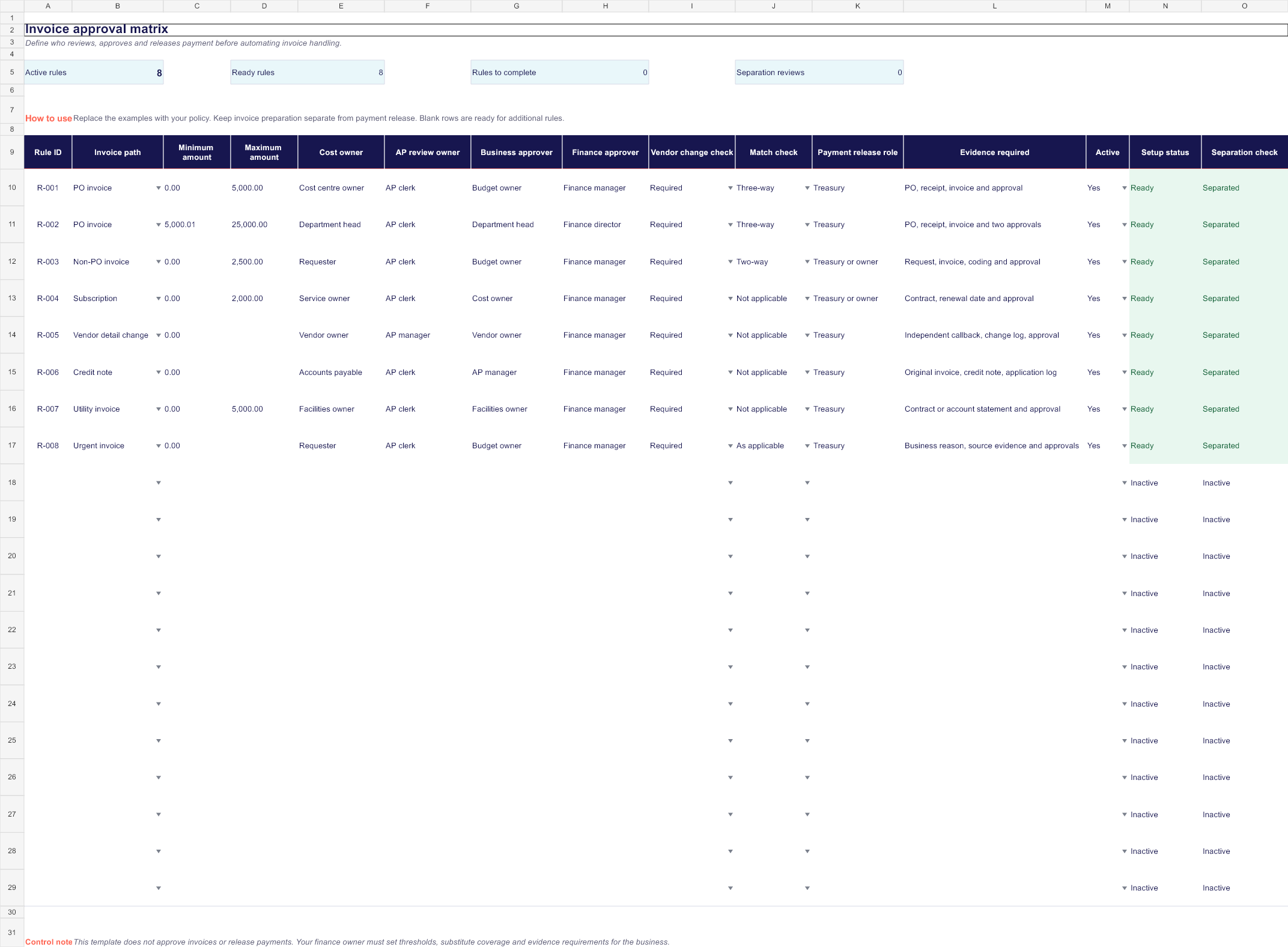
One editable worksheet with 20 rule rows, eight fictional examples, dropdown lists, amount bands and formula-driven setup and separation checks. Blank rows are ready for the invoice paths your team actually uses.
Inspect the approval matrix before downloading it.
The preview shows the real workbook: invoice path, amount band, five control roles, vendor-change and matching checks, required evidence and live setup warnings.
Make authority and evidence inspectable.
Amount bands
Set a minimum and maximum amount for each invoice path instead of relying on one approval rule for every payment.
Named control roles
Keep the cost owner, AP reviewer, business approver, finance approver and payment-release role visible.
Evidence requirements
Define the purchase order, receipt, contract, callback, approval or other record needed before the invoice advances.
Vendor-change checks
Give bank-detail and vendor-identity changes an explicit verification route outside the invoice message.
Separation check
Flag a rule when the same role reviews or approves the invoice and releases the payment.
Write the policy first. Automate the route second.
Start with PO, non-PO, subscription, credit-note, urgent and vendor-change cases that occur in your business.
Use maintained roles or groups. Define substitute coverage and expiry outside the matrix rather than routing to former employees.
Test amounts just below, at and above each threshold, plus a missing approver and a conflicting payment-release role.
The matrix documents control design. It grants no authority.
- It does not approve an invoice or expense.
- It does not validate supplier or bank details.
- It does not release or schedule a payment.
- It does not replace accounting, legal or internal-control review.
Questions about the invoice approval matrix.
Is the invoice approval matrix free?
Yes. The Excel workbook downloads immediately without an account, payment or email address.
Does RoutineSmith receive the data I enter?
No. The workbook is a local file. RoutineSmith does not receive your suppliers, amounts, roles, evidence or approval rules.
Are the included thresholds recommended limits?
No. The amount bands and roles are fictional examples, not a universal policy. Replace them with limits approved for your business, jurisdiction and banking controls.
Does the workbook approve invoices or release payments?
No. It documents the control design and highlights missing setup or incompatible roles. A properly authorized person still makes each approval and payment decision.
Can AI choose the approver?
AI may help extract or classify a proposed invoice path, but it should not invent authority. The current approved matrix and deterministic routing rules should decide who receives the request.
Will it work in Google Sheets?
The workbook is designed and tested for current desktop Excel. If you import it elsewhere, verify formulas, dropdown lists and conditional formatting before use.
Turn the matrix into a testable approval route.
The practical guide explains amount boundaries, sequential approvals, substitute coverage, vendor-change checks, segregation of duties and the limited role AI can safely play.
Build the approval workflow