 RoutineSmith
Quote and estimate follow-up tracker for small service teams.
Track sent estimates without relying on memory. Give every open quote one owner, one visible state and one deliberate next action. The workbook flags missing controls, overdue reviews and work that needs a person before contact.
One editable worksheet with 200 working rows, filters, date fields, controlled status lists, four synthetic examples and formula-driven actions. It suits contractors, consultants, agencies and other small service teams that send estimates. It is a lightweight operating control, not a CRM and not an automated sender.
Keep the seven-day control for your next review.
The tracker stays free without registration. If you want the operating checklist in your inbox, request it here.
See the control before you download it.
This is the supplied Excel workbook with its four synthetic examples. Yellow cells hold team inputs; the final columns calculate the control status and recommended next action.
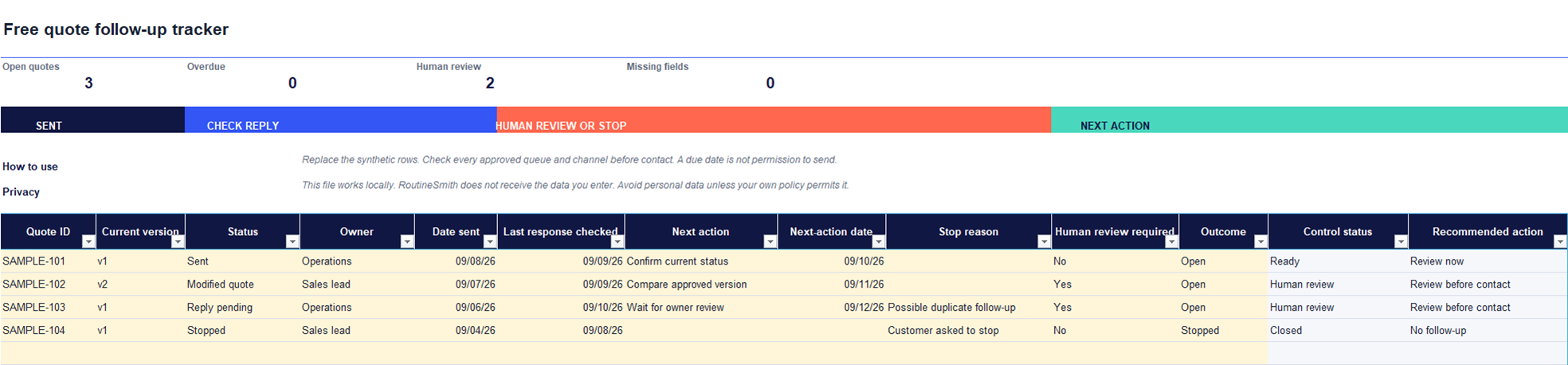
See the facts that should change the next action.
Quote ID + version
Keep the current approved record visible without adding customer details.
State + owner
Show who is accountable and whether the quote is sent, waiting, changed or closed.
Reply check
Record when someone checked the latest inbound and outbound activity.
Next action + date
Separate a review point from permission to contact the customer.
Stop reason
Make opt-outs, declines, changed scope, expiry and duplicate pursuit visible.
Human review
Route uncertainty to a person before another message is prepared or sent.
Replace the examples. Keep the control logic.
Add identifiers, ownership, dates, states and the next controlled action. Avoid unnecessary personal data.
The workbook identifies missing fields, overdue review points and records requiring human judgment.
Review the current quote version and every approved channel. A due date alone is not permission to send.
Questions about the quote tracker.
Is this quote follow-up tracker really free?
Yes. The Excel workbook downloads immediately without an account, payment or email address. The optional email form below sends a separate seven-day control guide.
What does the Excel template track?
It tracks a quote reference and version, status, owner, reply check, next review date, stop reason and whether human review is required. It deliberately avoids storing customer names, email addresses, prices or message text in the supplied examples.
Does the tracker send follow-up messages automatically?
No. It never contacts a customer. It helps a person verify the latest quote and conversation before deciding whether any follow-up is appropriate.
Can a small team use the same file?
Yes, if the team stores the workbook in its approved shared location and agrees on one owner per quote. The file does not provide simultaneous-editing controls, permissions or a complete audit trail.
Does it replace a CRM or estimating system?
No. It is a lightweight operating control for teams that need a reliable next-action view before adopting or changing software.
Will it work in Google Sheets?
The template is designed and tested for current desktop Excel. Importing it into another spreadsheet app may change formulas, validation lists or formatting, so verify every control before relying on a converted copy.
The tracker supports a decision. It does not make one.
- It does not connect to an inbox or CRM.
- It does not collect or upload customer records.
- It does not decide timing, channel, price, scope or legal permission.
- It does not send messages.
Check the next action before following up.
Use the free operating guide to verify ownership, the latest inbound and outbound messages, every approved channel and the stop conditions that may change the route.
Open the quote follow-up control checkWant guided implementation? Review the course curriculum.