 RoutineSmith
See which AI tools your team actually uses.
Give every tool or workflow one permitted purpose, one owner, a visible data boundary and a review trigger before access or automation expands.
Download the free Excel inventoryWorks locally. RoutineSmith does not receive what you enter.An AI tool inventory is a working list of the products, embedded features and automated workflows people use for business work. It records the exact use, accountable owner, allowed and prohibited data, access boundary, cost, decision and next review. Build the inventory before writing a large policy so the policy addresses real use.
Look beyond the obvious AI subscriptions.
Start with recent, observable business use. The goal is a useful first inventory, not surveillance or a claim that every system has been found.
People and teams
Ask what they used in the last 30 days, including personal trials used for business work. Record the observed use—not a guessed list of approved tools.
Browser and desktop
Review AI browser extensions, desktop assistants and saved integrations without copying prompts, customer content or credentials into the inventory.
SaaS features
Check whether email, CRM, meeting, support, accounting or design products have an AI feature switched on, even when AI is not a separate subscription.
Accounts and spend
Compare the team’s account list, automation platforms and software expenses with the inventory. Investigate a mismatch; do not treat payment as approval.
Start with examples, then replace them with observed use.
The workbook includes 100 working rows, three clearly marked fictional examples, status validation, review dates and a formula-driven completeness prompt. It does not score safety or compliance.
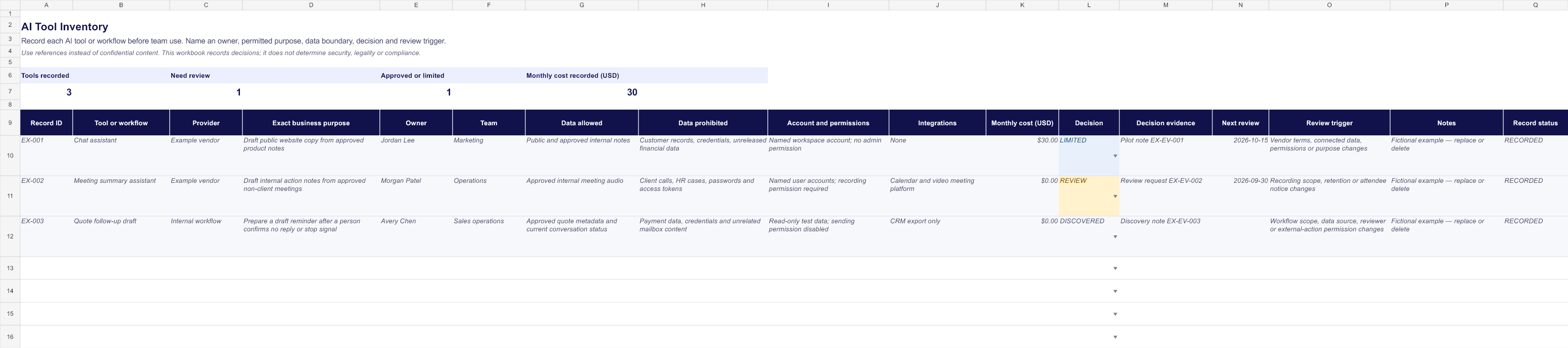
Keep the workbook and a seven-day review routine together.
The Excel download stays free without registration. Request one delivery email if you want the workbook plus a short routine for turning unknown tools into owned decisions.
A small inventory that supports real operating decisions.
Tool and provider
Name the exact product, embedded feature or internal workflow. Avoid broad entries such as ‘AI’ or ‘automation’.
Purpose and owner
Record the permitted business task and one person accountable for the use, evidence and next review.
Data boundary
State what data may enter the tool and what must remain outside it, including credentials and customer records.
Account and permissions
Record the account type, relevant access level and whether the tool can read, write, send or trigger an external action.
Integrations and cost
List connected systems and the currently observed monthly cost. Leave unknown values visible instead of estimating them.
Decision and evidence
Choose DISCOVERED, REVIEW, APPROVED, LIMITED or STOPPED and reference the person and evidence behind the decision.
Next review
Set a date or material-change trigger so a trial, permission or operating assumption does not remain unreviewed.
Find, bound, decide and review.
- 01
Discover
Ask each team which AI tools, embedded features and automated workflows they actually use.
- 02
Bound
Name the exact permitted purpose, prohibited data and external-action limit for every record.
- 03
Decide
Assign a named owner and record whether use is approved, limited, under review or stopped.
- 04
Maintain
Review on the stated date and after a vendor, model, permission, integration, cost or purpose changes.
An inventory records a decision. It does not make one.
- Do not infer that an unlisted tool is prohibited or that a listed tool is approved.
- Do not treat a status or cost field as proof of security, legality, compliance or business value.
- Keep credentials, customer content and confidential evidence outside the workbook.
- Use a qualified review when the tool affects people, regulated work or consequential decisions.
Keep the operating record current.
When a tool is connected to data, permissions, integrations or external actions, record material changes, retests and recovery ownership in the maintenance log.
Questions about the inventory.
Is the AI tool inventory free?
Yes. The editable Excel workbook downloads directly without an account, payment or email address.
Should we record every AI feature?
Record tools, embedded features and workflows that people use for business work. Keep each entry specific enough to name its purpose, owner and data boundary.
How do we find AI tools people forgot to report?
Run a short discovery pass across recent team use, browser and desktop extensions, AI features embedded in existing software, automation platforms, accounts and software expenses. Confirm actual business use before adding a record.
Is this the same as an AI risk register?
No. An inventory establishes what exists and who owns it. A risk register records identified risks, evidence, controls and treatment decisions for a defined system and use.
Does an APPROVED row prove the tool is safe or compliant?
No. The status records an internal decision. It does not determine security, privacy, legality, fairness or compliance.
What should stay outside the workbook?
Do not paste credentials, customer records, confidential source text or sensitive evidence. Store references to approved evidence locations instead.
Turn one approved use into a bounded pilot.
RoutineSmith teaches practical workflow selection, testing, human approval and recovery. Review the curriculum only if you need guided implementation.
Review the practical course