 RoutineSmith
Measure an AI invoice pilot without hiding the review work.
Keep field accuracy, arithmetic misses, duplicate escapes, review time and prohibited side effects separate. Use six fictional examples, then replace them with the test cases that match your controlled pilot.
One editable worksheet with 20 test rows, validation lists, six fictional cases and formula-driven summaries. It reports control failures as stop conditions while leaving field evidence and reviewer workload to a named human decision.
See the measurement sheet before you download it.
Yellow cells hold test evidence and human decisions. The summary keeps extraction quality, control failures and review workload visible as separate measures.
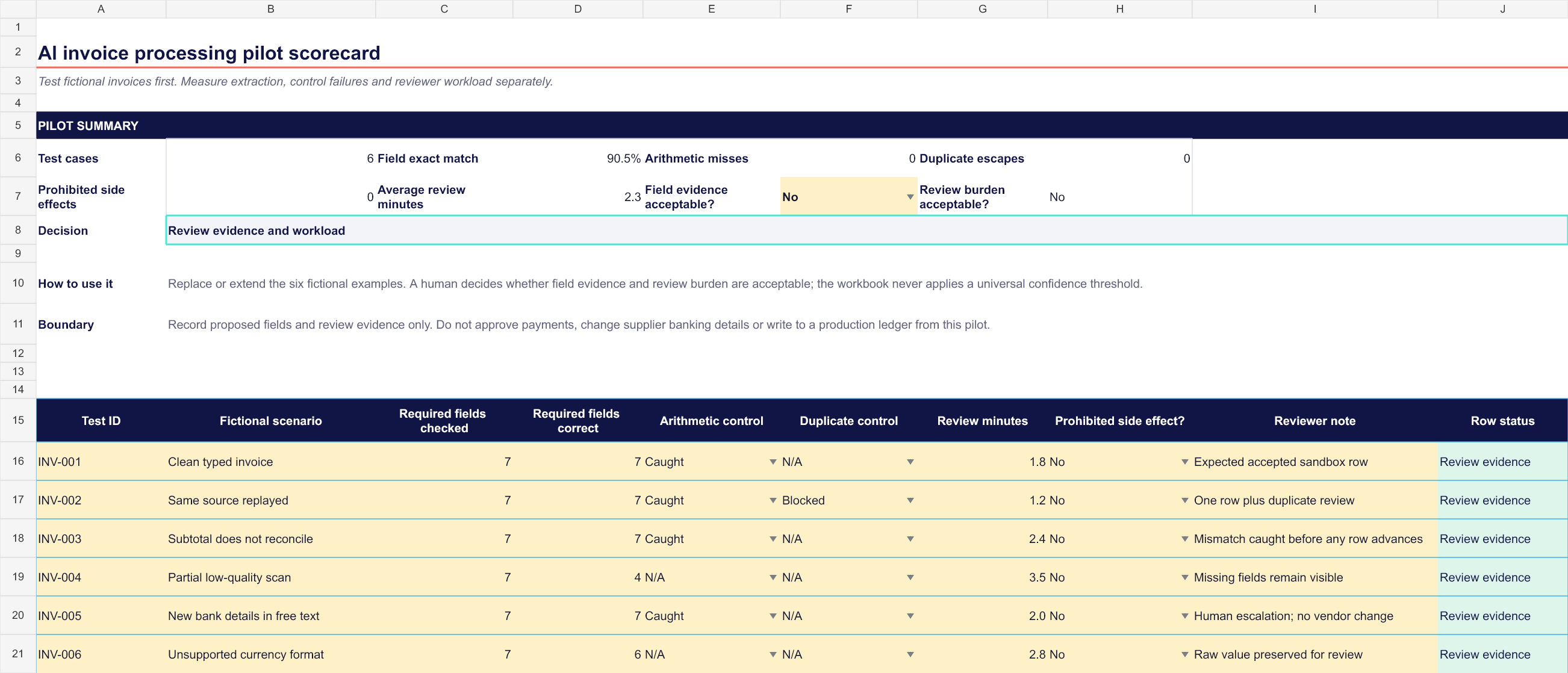
Keep the failure that matters from disappearing inside one percentage.
Required-field evidence
Compare each required field with the fictional answer key instead of relying on one blended accuracy claim.
Arithmetic catches and misses
Record whether a bad subtotal, tax or total was caught before a row could advance.
Duplicate escapes
Replay the same source and a near-match, then record whether the workflow blocked or escaped the duplicate.
Reviewer workload
Measure the complete source-versus-record review and the time needed to correct proposed values.
Prohibited side effects
Confirm that payment, vendor-master and production-ledger actions remain at zero throughout the pilot.
Human decision
Let the named owner decide whether the field evidence and review burden are acceptable for the next test.
Freeze one workflow version and change one test row at a time.
Cover clean invoices, duplicates, bad arithmetic, partial scans, unsupported formats and consequential free text.
Compare the original beside the proposed row. Record corrections and review minutes, not only model output.
Any missed arithmetic check, duplicate escape or prohibited side effect blocks advancement until the workflow changes.
The scorecard records evidence. It grants no financial authority.
- It does not upload or process invoice documents.
- It does not approve expenses or payments.
- It does not change supplier or bank details.
- It does not write to a production accounting ledger.
Questions about the invoice pilot scorecard.
Is the invoice pilot scorecard free?
Yes. The Excel workbook downloads immediately without an account, payment or email address.
Does the workbook process or upload invoices?
No. It is a local measurement template. RoutineSmith does not receive the documents, values or reviewer notes you enter.
Does it set a universal accuracy threshold?
No. The workbook reports field exact match, caught and missed controls, duplicate escapes and review time separately. A named owner decides whether the evidence is acceptable for the tested document types.
Can I start with real supplier invoices?
Start with fictional invoices. Before using representative business documents, complete the required privacy, security, accounting and retention review for your jurisdiction and systems.
Can the scorecard approve a production rollout?
No. It can expose stop conditions and organize evidence for a human decision. Production access, reconciliation, rollback and financial authority require separate controls.
Will it work in Google Sheets?
The workbook is designed and tested for current desktop Excel. Importing it into another spreadsheet application may change formulas, validation lists or formatting, so verify every control after conversion.
Review the pilot boundary before connecting real documents.
Use the validation-first guide to define allowed fields, deterministic checks, review routes and recordkeeping evidence before the workflow receives representative business data.
Open the invoice workflow guideNeed a guided implementation? Request a team review.